
Blog d'un ingénieur en réseau et en Dev informatique.
mardi 5 avril 2011
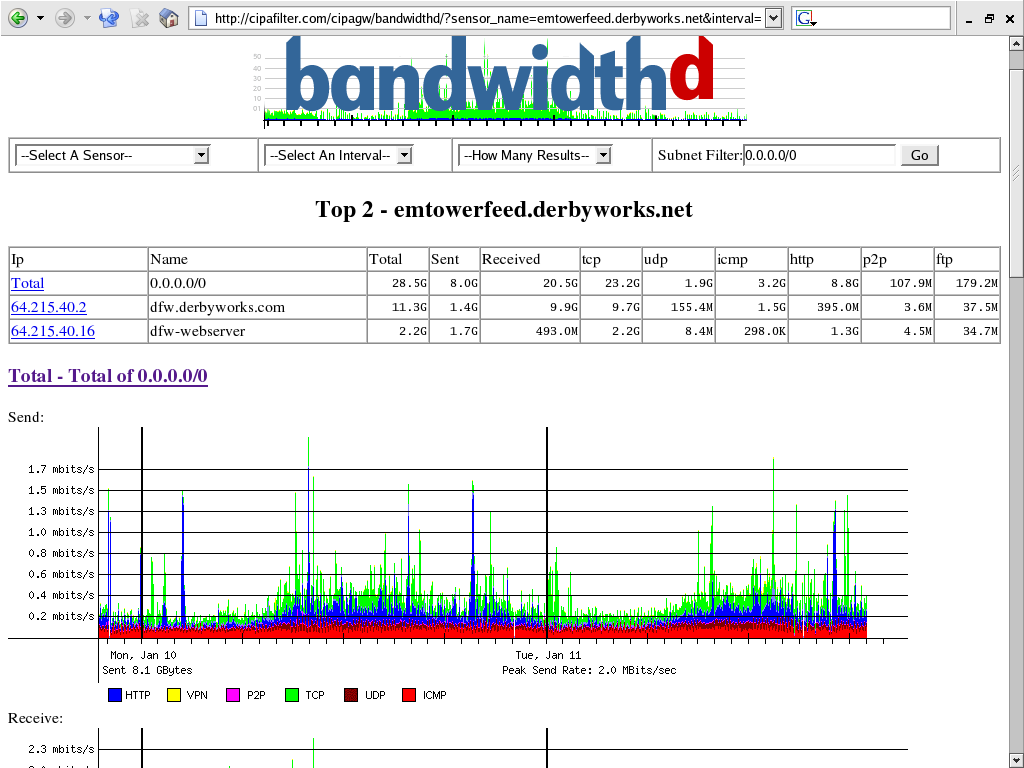
bandwithd

ip traffic

port 137 windwos
Port de partage fichier pour un partage windows ! si tu le désactive, tu ne pourra plus partager de fichier via réseau local !
lundi 4 avril 2011
Zypper
Zypper est un gestionnaire de paquets en ligne de commande qui utilise libzypp et qui fournit des fonctions telles que l'accès aux dépôts, la résolution de dépendances, l'installation de paquets, etc.
Les dépôts de paquets YaST2 et RPM MetaData sont supportés. Les dépôts Zypper sont similaires à ceux utilisés dans YaST, qui utilise également libzypp. Zypper peut également gérer les extensions de dépôts comme les patches, les schémas et les produits.
command
sudo zypper install gcc
afficher and clear dns cach for bind
http://www.oreillynet.com/pub/a/network/excerpt/dnsbindcook_ch05/index.html?page=2
Cache flushing helps solve many networking problems including erroneous DNS resolution. We suggest that you flush your DNS resolver caches after setting up OpenDNS to ensure that your computer uses OpenDNS as it's DNS resolver.
Windows Operating Systems:
Mac OSX 10.4 (Tiger):
lookupd -flushcache
Mac OSX 10.5/10.6 (Leopard/Snow Leopard):
Linux (Most distros):
Cache flushing helps solve many networking problems including erroneous DNS resolution. We suggest that you flush your DNS resolver caches after setting up OpenDNS to ensure that your computer uses OpenDNS as it's DNS resolver.
The local DNS resolver cache of your operating system can be flushed by running the following commands from the command prompt or command line.
Alternatively, restarting your computer flushes your DNS resolver caches.Windows Operating Systems:
ipconfig /flushdns
(Note: Windows users may need to run the Command Prompt 'As Administrator' in order to use this command.)
Mac OSX 10.4 (Tiger):
lookupd -flushcache
Mac OSX 10.5/10.6 (Leopard/Snow Leopard):
dscacheutil -flushcache
Linux (Most distros):
sudo /etc/init.d/nscd restart
OR:
sudo /etc/init.d/networking restartvitess cnx et le cache dns
| Quand vous naviguez sur un site, votre ordinateur se connecte à un serveur de nom de domaine afin de connaître à quelle IP correspond le DNS demandé. Dans le but d’éviter de faire à chaque fois appel à ce serveur de DNS pour chaque nouvelle connexion sur un même site, Windows conserve localement cette correspondance dans un cache, ce qui accélère l’accès au site web demandé. Cette astuce va nous permettre de définir une taille plus importante de ce cache DNS afin de stocker plus de correspondances DNS->IP et ainsi accélérer le temps d’accès aux sites déjà visités. Pour y arriver, suivez ces étapes: |
 Démarrer, Exécuter puis tapez regedit Allez dans HKEY_LOCAL_MACHINE/SYSTEM/CurrentControlSet/Services/Dnscache/ Parameters Créez les clés DWORD suivantes et donnez leur la valeur indiquée ci-dessous en hexadécimal :
CacheHashTableBucketSize = 00000001
CacheHashTableSize = 00000180
MaxCacheEntryTtlLimit = 0000fa00
MaxSOACacheEntryTtlLimit = 0000012d
iftop
outil de mesure de la bande passante sur machine
http://planet.ubuntu-fr.org/post/2006/10/19/Voir-letat-de-la-bande-passante-avec-iftop
available sur yast instal/remove
http://planet.ubuntu-fr.org/post/2006/10/19/Voir-letat-de-la-bande-passante-avec-iftop
available sur yast instal/remove
Inscription à :
Articles (Atom)